JARVIS is a realtime conversational AI with a photorealistic live avatar, screen awareness and a team of autonomous agents — on iOS, Android, macOS, Windows and Linux.
Orb for every day. Avatar for face‑to‑face. Neural map for the big picture.
Switch with a single tap. Orb is a living 3D interface that reacts to your voice. Avatar puts a photorealistic face on the same conversation. Neural map shows JARVIS and your agent working, live.
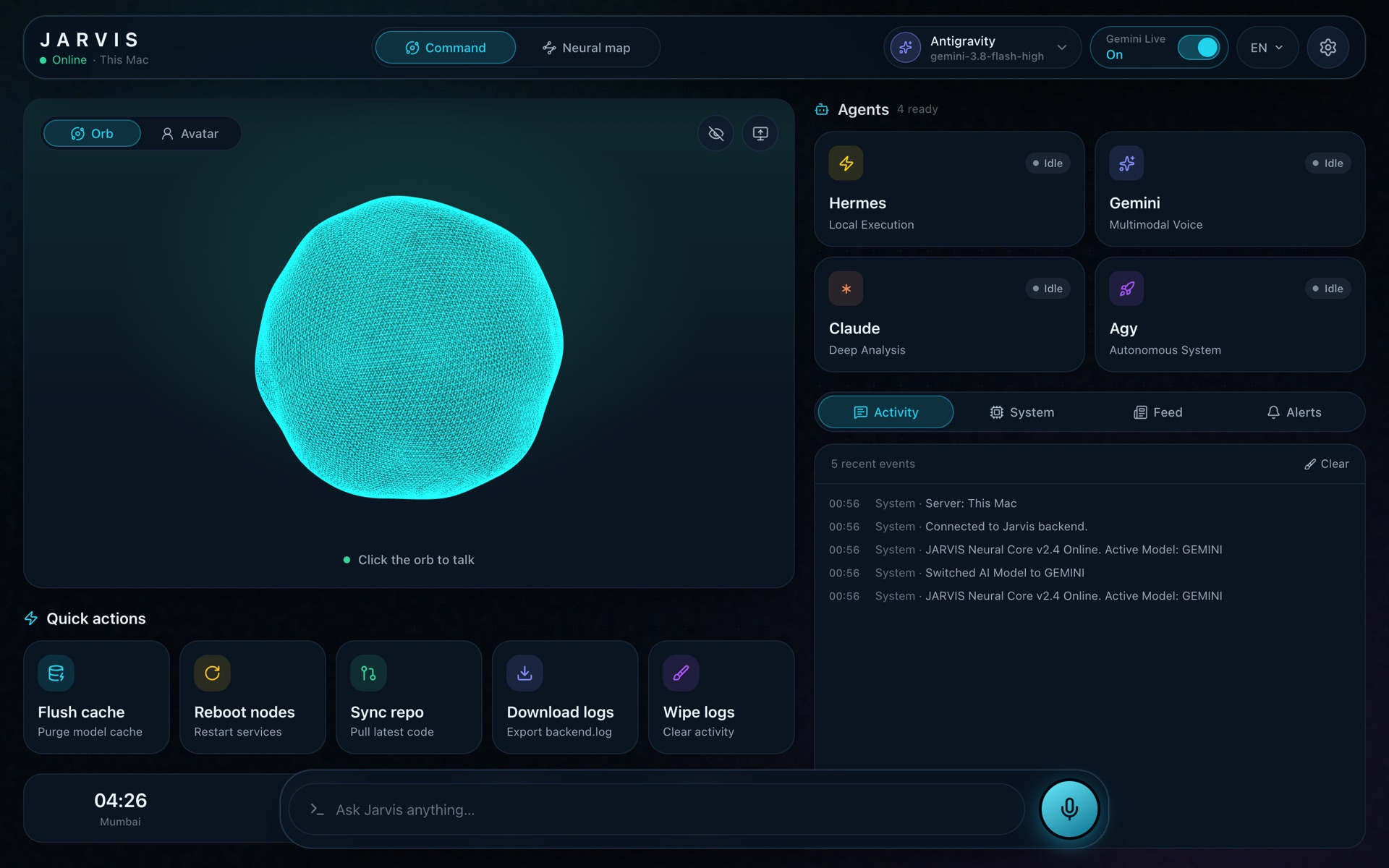
Orb mode
Real-time 3D orb that breathes with your voice
Runs on any iPhone, Android, Mac or PC
Full voice, vision, agents and live cards
No special hardware
Avatar mode
Photorealistic face, streamed live at 25 FPS
Expressions and gestures synced to every word
17 personas, multiple voices
NVIDIA GPU (Ampere or later recommended) — or Jarvis Cloud
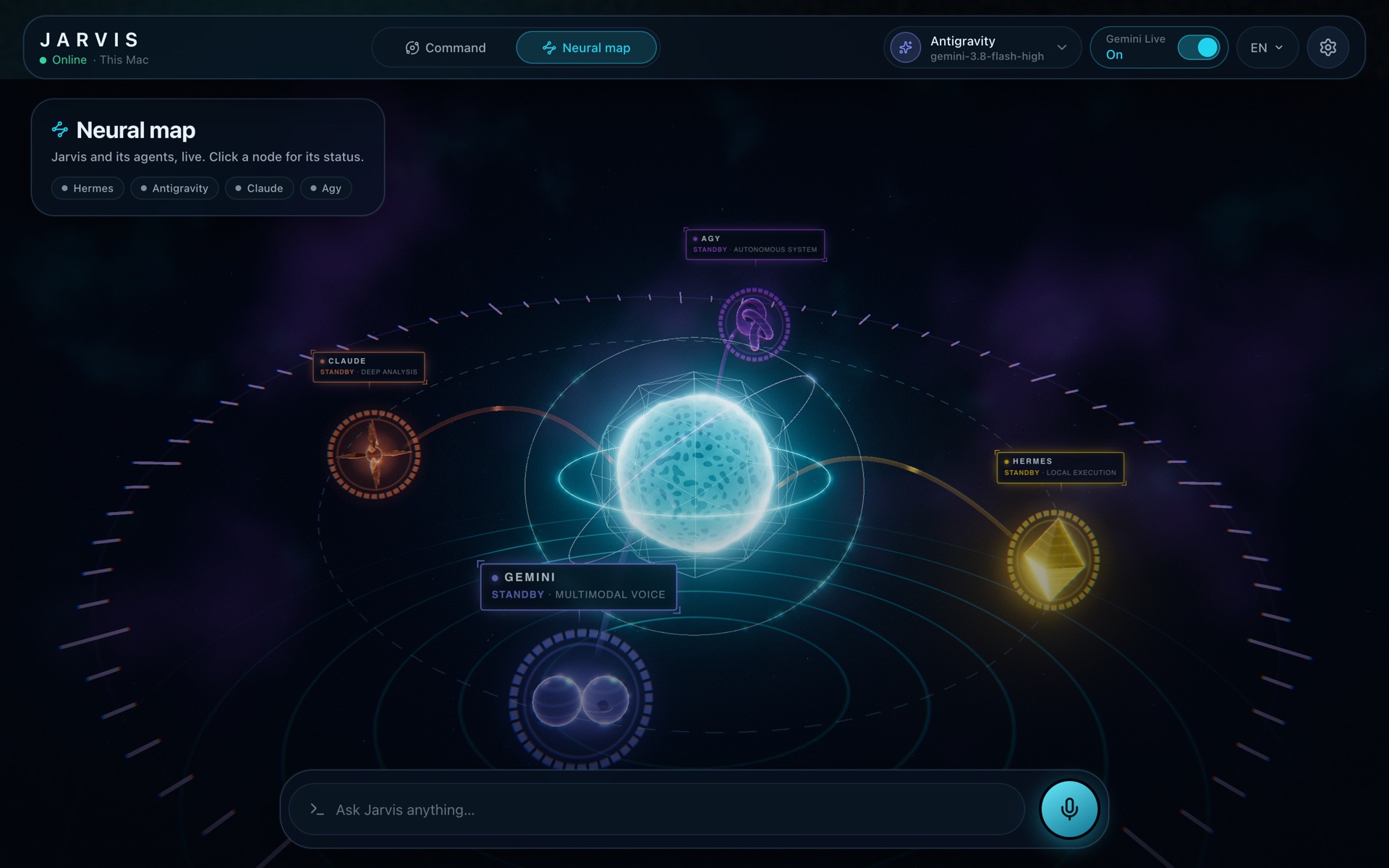
Neural map
Live 3D topology of JARVIS and its agents
See which agent is working, in real time
Agent status and system activity at a glance
No special hardware
Orb modeAvatar modeNeural map
Sub-second voice duplex✦25 FPS neural avatar✦Screen & camera vision✦Your agent, on your computer✦Live data cards✦Neural map✦Local-first✦Jarvis Cloud✦
Sub-second voice duplex✦25 FPS neural avatar✦Screen & camera vision✦Your agent, on your computer✦Live data cards✦Neural map✦Local-first✦Jarvis Cloud✦
02 — In action
One conversation. Everything done.
A real, unedited session with JARVIS on iPhone. Just talk — it listens, looks and answers.
01
Realtime voice
Answers in under a second
Talk naturally and get spoken answers back in under a second. Local voice detection, speech recognition and a gapless audio pipeline keep the conversation flowing.
You“Thank you so much. Have a great day.”
Jarvis“You have a great day too!”
02
“Eyes On” vision
It sees what you see
Turn on Eyes On and JARVIS watches your camera or screen in real time, while it floats over any app as a live picture-in-picture.
You“What do you see actually right now?”
Jarvis“…you tapped on that one of the black and white cat.”
03
Gemini Live multimodal
Help with anything on your screen
Voice and vision stream to Gemini Live together, so JARVIS can follow along and walk you through any app, one tap at a time.
You“How can I switch off the notifications here in the settings?”
Jarvis“Scroll down a bit… tap on Notifications.”
04
Dynamic overlay cards
Answers become live cards
Weather, markets, flights, recipes and more arrive as rich interactive cards — not walls of text.
You“Is it going to rain here in Paris today?”
Jarvis“Paris is clear of rain for the rest of the day — around 21°C.”
05
Financial ticker & charts
Live prices & charts
Crypto and stocks with interactive charts, time ranges, day highs and lows — pulled live while you talk.
You“What's the Bitcoin price?”
Jarvis“Bitcoin is trading at approximately $83,860 USD.”
LIVE01 / 05 · Realtime voice
Eyes On, everywhere
It sees your screen and your world.
Share your screen or your camera, on your phone or your computer, and JARVIS follows along in real time. On iPhone it keeps watching while you use other apps, floating above them in picture‑in‑picture.
Free on your computer. On the phone, camera, screen sharing and picture‑in‑picture come with any Jarvis Cloud plan.
iPhoneAndroidComputer
CameraYesYesYes
ScreenYes, even in the backgroundComing soonYes
Picture‑in‑pictureYesComing soon—
Picture-in-pictureFloats over any app
Eyes OnScreen · Camera
Things people do with it
ScreenWalk me through it
Settings, forms and new apps, one tap at a time.
How do I turn off notifications here?CameraCook with me
Point at the counter and get a recipe from what you have.
What can I make with this?CameraRead the world
Menus, signs and labels, translated and explained.
What does this menu say?CameraFix it
A dripping tap, a blinking router, a strange noise from the car.
Why is this light flashing?Screen · ComputerSecond pair of eyes on code
JARVIS reads the error on screen and hands the fix to your agent.
Why does this test fail?ScreenExplain this chart
Dashboards, spreadsheets and reports, in plain words.
What changed since last month?CameraHomework helper
Show the worksheet; get hints, not just answers.
Help me understand question 3.CameraDescribe what's around me
Spoken descriptions of a room, a street or a product.
What's in front of me?
0s
Voice round-trip latency
0fps
Neural live avatar
0
Selectable personas
0
Agents to choose from
0
Live overlay cards
0
Platforms
03 — Shows you anything
Answers you can see.
Whenever JARVIS or one of its agents returns complex data, it turns into an interactive card — on web and mobile. Every card flips to raw text in one tap.
☁
WeatherParis
Visual · Text
21°Mostly sunny H 23° · L 14°
Now☀21°
15h☀22°
16h⛅23°
17h⛅21°
18h☁19°
Mon
Tue
Wed
↗
MarketBTC · USD
● Live
$83,860.01
▲ +$262.49 · +0.31% today
1D1W1M1YALL
✈
Flight radarAA 178
● En route
JFKNew York
✈
LHRLondon
Terminal8
GateB12
Altitude36,000 ft
Speed540 kt
⚡
Hardware telemetryThis machine
62%CPU
71°GPU
48%RAM
NVMe
↑ Up
↓ Down
☰
Project roadmapDeploy full-stack app
Provision databaseHigh
Configure CI pipelineHigh
Set up domain & SSLUrgent
Load-test the APIAgent: stark
♫
Hi-Fi audioLossless · 24-bit
Midnight ProtocolNeon Avenue
City lights are humming low
Every signal finds its way home
Somewhere past the afterglow
文
Translation matrixEN → JA
English
The future belongs to curious minds.
Japanese
未来は好奇心旺盛な人のものだ。
miɾai wa koːkiɕin oːseː na hito no mono da
▤
Data chartFrom your table
Q1
Q2
Q3
Q4
Series ASeries BSeries C
⚽
Match centerSample match
● 78'
HHome
2 – 1
AAway
Possession
Shots
◔
CarbonaraPrep 10 m · Cook 15 m
24gProtein
62gCarbs
28gFats
200g spaghetti
3 egg yolks + pecorino
Guanciale, black pepper
◈
Crypto wallet0x71C2…3948
EthereumSolanaBasePolygon
ETH+2.1%
SOL+4.6%
USDC0.0%
And anything else
Ask to see it. JARVIS puts it on screen.
Photos, videos, 3D models, documents, audio and data open right inside the conversation, on desktop and mobile. Ask for something from the web or a file on your computer, and JARVIS shows it.
ImagesPNG · JPG · GIF · WebP · SVG
VideoMP4 · WebM · MOV · MKV
3D modelsGLB · GLTF · OBJ · FBX · STL
DocumentsPDF · Markdown · TXT · logs
AudioMP3 · WAV · FLAC · M4A · OGG
DataCSV · JSON → tables & charts
04 — Your agent, your computer
Pick your agent. It works on your computer.
Choose the agent that does the work — Claude, Gemini or Hermes. It runs right on your own computer, handling code, files, research, browsing and terminal tasks, while JARVIS keeps you posted out loud.
claude — running on this computer
Neural mapLive agent topology
ClaudeWorking…
Runs onYour computer
StreamWebRTC · H.264
Frame rate25 FPS live
Speaking…
05 — A face for your AI
A face for your AI. Live, at 25 FPS.
A photorealistic avatar streamed over WebRTC, with facial expressions and gestures synced to every word. Pick a persona, pick a voice — and talk face to face.
Expressions & gestures synchronized to speech
Hardware-accelerated H.264 for instant decoding
Gemini Live duplex or agent-driven TTS pipelines
Tells you out loud what your agent is doing
Runs on NVIDIA GPUs
Self-hosting the live avatar requires an NVIDIA GPU — Ampere (RTX 30-series) or later recommended. No GPU? Stream it from Jarvis Cloud →
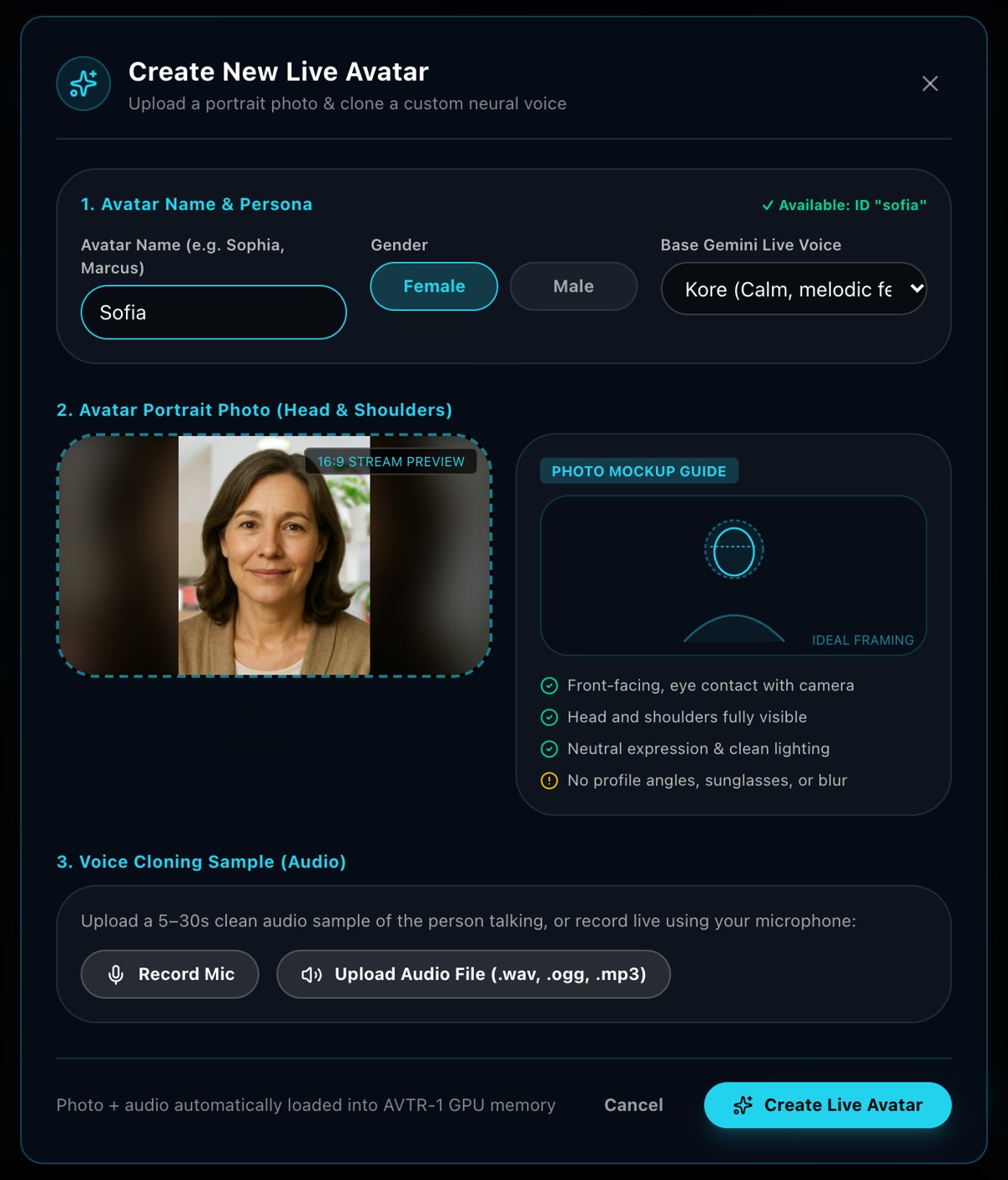
One photo and a short voice recording are all it takes. JARVIS prepares the portrait, clones the voice, and your avatar is ready to talk in about a minute.
Add a portraitHead and shoulders, facing the camera.
Record your voice10 to 30 seconds of natural speech.
Talk face to faceYour avatar answers live, at 25 FPS.
Free on your own NVIDIA GPU. Included in Cloud Plus (1 a month) and Pro (5 a month). Only your own face and voice, or someone who agreed, and every avatar is labeled as AI.
Create New Live Avatar
LIVEReady in about a minute
06 — On every screen
One JARVIS. Desktop, phone and wrist.
The desktop app runs JARVIS and your agents on your computer. Your phone and your watch talk to the same JARVIS, at home, or anywhere with Jarvis Cloud.
macOSWindowsLinuxiOSAndroid
Mac, Windows & Linux
The desktop app runs everything.
One free app with the JARVIS server inside. Your agents work on your files, JARVIS sees your screen, and your phone and watch connect to it. Nothing to configure.
Command center with your agents, live cards and activity
The Neural map shows every agent at work
Screen and camera vision, free on your computer
Starts with your computer and lives in the menu bar
Neural map
JARVIS
playoutDelayHint = 0
useinbandfec=1 · usedtx=1
🎧 AirPods connected · auto-routed
b=AS:2500
iPhone & Android
Built for 5G. Tuned for real life.
Everything the desktop does, in your pocket, engineered for the street, not the lab. Camera, screen sharing and picture‑in‑picture come with any Jarvis Cloud plan.
Zero-latency playout
Frames render the instant they arrive; the player snaps back to the live edge if the network drifts past 250 ms.
Cellular-grade WebRTC
Opus FEC + DTX and bitrate caps keep audio clean through 5G carrier hand-offs.
Picture-in-picture
On iPhone, JARVIS keeps listening and watching in a floating window while you use other apps.
Smart audio routing
AirPods, Bluetooth, wired or speaker — JARVIS switches instantly without dropping a word.
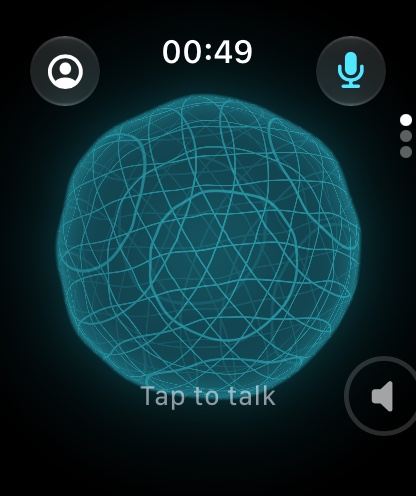
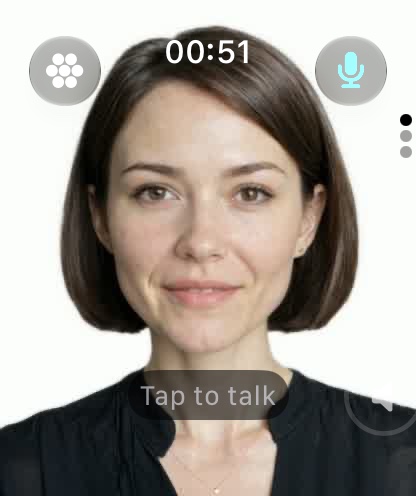
Apple Watch
JARVIS on your wrist.
Raise your wrist and talk. JARVIS answers in your ear, the live avatar appears right on the watch, and answers arrive as cards you can glance at. No phone in hand.
Tap to talk
The orb listens the moment you tap, and answers out loud.
Live avatar on the watch
The face of your AI, streamed straight to your wrist.
Glanceable cards
Weather, markets and agent answers, sized for the watch.
Set up once
It follows your iPhone's JARVIS settings automatically.
New07 — Jarvis Cloud
Live avatar. No GPU required.
The live avatar runs on a powerful NVIDIA GPU — Ampere or later. Don't have one? Jarvis Cloud runs your avatar on our GPUs for you, streamed in real time to your phone, tablet or computer.
Log in to your Jarvis Cloud account from the JARVIS app.
2Connect
JARVIS securely links your account to a cloud GPU — nothing to install.
3Talk face to face
Your live avatar streams to your device in real time, wherever you are.
⌁No GPU needed
Skip the expensive graphics card. Our NVIDIA GPUs do the heavy lifting for you.
⧉Works on what you own
iPhone, Android, Mac, Windows or Linux — if it runs JARVIS, it can show your avatar.
⚿Sign in and talk
One account. No drivers, no servers, no setup — just log in from the app.
☺Every persona, every voice
All 17 personas and their voices, ready on any of your devices.
⚡Smooth on the go
Tuned for 5G with error correction and smart bitrate, so conversations stay clear on mobile.
↻Always up to date
We keep the GPUs and the avatar engine updated. You just talk.
Self-hostedJarvis Cloud
GPUYour own NVIDIA GPU — Ampere or later recommendedNone needed — ours run it
SetupCUDA drivers and the avatar server (WSL2 on Windows)Sign in from the JARVIS app
Where it worksWherever your GPU machine is reachableAnywhere you're online
UpkeepYou install, update and run itWe keep it running and up to date
Best forTinkerers with a capable GPUEveryone else
Private by design
JARVIS runs on your own computer, with local Whisper and Ollama or the providers you choose. Jarvis Cloud never keeps your photos, voice, files or conversations. Read the Privacy Policy →
Self-hosted
Free open source · MIT
The full JARVIS runtime on your own computer.
Voice, vision, live cards and the Neural map
Orb mode on any device
Your choice of agent: Claude, Gemini or Hermes
Live avatar on your NVIDIA GPU Ampere or later recommended
Coming soon on GitHubEarly access
Jarvis Cloud
Early access pricing announced at launch
Everything in Self-hosted, plus the live avatar without a GPU.
No. Voice, vision, live cards, Orb mode and your agent all run without one. Only the photorealistic live avatar needs an NVIDIA GPU — or a Jarvis Cloud account, which runs it for you.
Which GPU do I need to self-host the avatar?
An NVIDIA GPU with CUDA. We recommend Ampere or later — that's the RTX 30-series and every newer generation.
How does Jarvis Cloud work?
Sign in with your Jarvis Cloud account in the JARVIS app. Your avatar then runs on our NVIDIA GPUs and streams to your device in real time — nothing to install, no drivers to manage.
Is the self-hosted version still free?
Yes. JARVIS is open source under the MIT license. Jarvis Cloud is the paid option for running the live avatar without your own GPU.
Can JARVIS be tailored to my business?
Yes. The Enterprise plan includes a custom implementation built around your specific use case, with dedicated capacity and hands-on onboarding.
When can I start using Jarvis Cloud?
Jarvis Cloud is in early access. Join the waitlist and we'll reach out with access and pricing.
Early access
Your JARVIS is ready.
Join the early-access list — try JARVIS, or skip the GPU and run your live avatar on Jarvis Cloud.
Early access
Get early access to Jarvis‑Live
Tell us a little about you — we'll reach out as soon as your spot opens.